Firebear Studio
Shoplift is a dangerous
Magento bug. It allows hackers to take
e-commerce store under a full control. The threat was discovered by Check Point. You can easily fix it with the help of patch
SUPEE-5344.
A lot of Magento stores are still vulnerable, because they haven’t
applied the patch yet. Below, you we show how to fix the problem.
UPD (15.05.15): SUPEE-5994
UPD (08.07.15): SUPEE-6285
UPD (08.07.15): Magento Security Alert Registry
UPD (05.08.15): SUPEE-6482
UPD (17.09.15): SUPEE-3762
SUPEE-3762: Denial of Service flaw
This bug crashes the whole shop when a specific API request
is made. The affwcted versions of Magento are 1.9.0.0 and 1.9.0.1. The
problem can be healed with
SUPEE-3762:
You are redirected to /index.php/install from frontpage or get the following error:
|
|
PHP Warning: SoapServer::SoapServer(): I/O warning : failed to load external entity
"http://hostname.com/index.php/api/soap/index/?wsdl=1&wsdl%2F_vti_bin%2FListData_svc%2F%24metadata="
in /var/www/html/lib/Zend/Soap/Server.php on line 811
|
quickly fix it by putting the following code on top of index.php (thanks to Ben Lessani):
|
|
libxml_disable_entity_loader(false);
|
SUPEE-6482
A new patch called SUPEE-6482 has been
released! This time it fixes 4 security issues related to APIs and
cross-site scripting. Luckily, there are no victims of these bugs, so
the patch is a preventive measure. The issues are described below.
This problem is possible only on a server with specific
configurations. Since an unvalidated host header leaks into a page and
an attacker can inject any HTML or JavaScript code adding fake forms for
example, all store customers are under risk.
The issue causes code to be autoloaded. This happens
because of SOAP API request incorrect validation. Again, the problem
requires specific settings, but with appropriate conditions, attackers
can load code remotely, as well as log in first with API credentials.
This threat is aimed at registered users. Attackers can thieve cookies and impersonate your customers.
Due to incorrect encoding of API password, attackers are
able to probe internal network resources as well as include remote
files.
Support
SUPEE-6482 was designed for both Magento Community
and Magento Enterprise Editions. Being part of Community Edition
1.9.2.1, it is supported by CE 1.4+. For EE, the patch is available
since 1.7 version of the platform. It will be embedded into Enterprise
Edition 1.14.2.1.
Download
SUPEE-6482 requires all previous security patches to be installed. Community Edition merchants can download the patch on the Community Edition
download page, or
upgrade to 1.9.2.1. Enterprise Edition merchants can find the improvement on
My Account > Downloads tab, > Magento Enterprise Edition > Support Patches. There is also an ability to upgrade to 1.14.2.1.
SUPEE-6285
The SUPEE-6285 patch introduces a new
level of security. It fixes a weakness that has been recently found in
Magento. Luckily, there are no ecommerce shops attacked owing to this
issue, but it doesn’t mean you can delay the installation of SUPEE-6285.
Deploy the patch immediately and you will provide your store with an
additional security level.
First of all the SUPEE-6285 security patch blocks
attackers. It prevents them from getting an access to the orders feed.
Thus, you preserve personal data. Then, the patch fixes a number of
security gaps, such as a cross-site scripting and a request forgery, or
vulnerabilities related to the error path disclosure.
The patch is available for Magento Enterprise Edition 1.9+ and Magento Community Edition 1.4.1-1.9.1.1.
Since SUPEE-6285 is a part of Community Edition 1.9.2, you
can easily fix all security problems by upgrading your ecommerce website
to the latest version of the platform. The download link is here:
Magento Community Edition 1.9.2.
Please note that SUPEE-6285 can be implemented only if
SUPEE-5994 has been already installed on your website. To check if
everything works as expected, use a development environment first.
The full list of SUPEE-6285 fixes
Since the SUPEE-6285 file consists of more than 1,100 lines
of code, it provides lots of changes. The patch includes 350 additions
and 100 removals. Thus, there are several strict requirements as well as
possible errors. You can check all of them
here.
And
this is a detailed description of SUPEE-6285. If you don’t know how to install the patch, look at
this guide.
If you don’t know whether your Magento version requires
SUPEE-6285 or any other previous patch, check a Magento patch
requirement/compatibility spreadsheet by John Knowles. It is available
in Google Docs divided into two parts. The first one is related to
Magento Enterprise Edition. The second part shows us patch requirements
and compatibilities of Community Edition. Both provide information on
all available patches, their release dates, compatibility with available
versions of the platform, as well as an installation necessity. You can
find the spreadsheet
here.
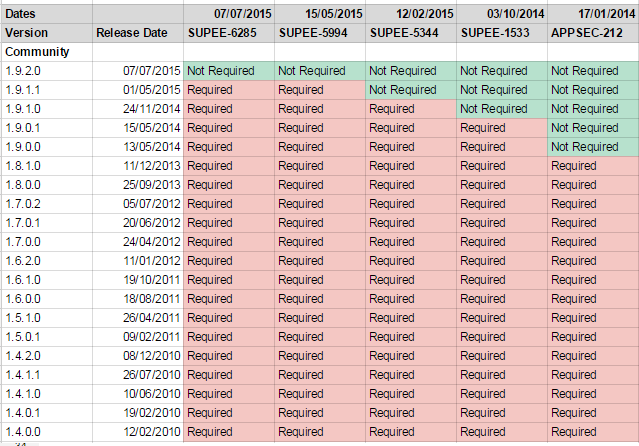
Magento Security Patch List
Download SUPEE-6285
Magento Security Alert Registry
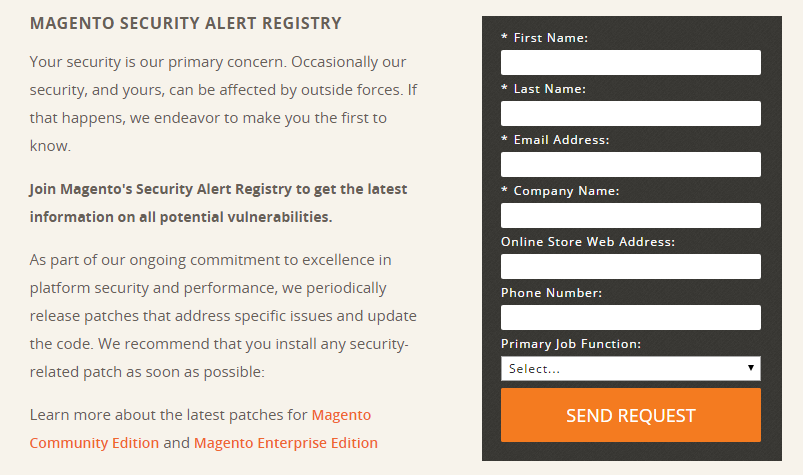
With Security Alert Registry, Magento introduces a new
approach to safety. The new service is designed to inform you about all
the latest vulnerabilities. Fill in a form and send your request
here to get all the latest information related to the Magento security issues.
SUPEE-5994
Magento has released a new patch – SUPEE-5994. It’s aimed to fix the set of security problems and multiple bugs related to the safety of your e-commerce store.
All versions of Magento CE are impacted, that’s why it is extremely necessary to install SUPEE-5994 patch immediately.
SUPEE-5994 should be installed after SUPEE-5344 – Shoplift patch.
Hit
this link to download
SUPEE-5994 security patch. It is available for CE 1.4.1– 1.9.1.1.
We strongly recommend you to start your work with the patch
from a development environment. Before deploying it to a production
site, don’t forget to make a backup.
___________________________________
Thousands of stores are not updated just because
their owners are not informed, they lack of technical support, or their
hosting does not provide SSH access. Of course, there are lots of other
issues. Being a part of Magento community, we always
try to take care of other dwellers of Magento ecosystem, so we share
this information with you. We also hope, you will share it with other Magento members.
First of all, we recommend you to use this link –
https://shoplift.byte.nl/ – it’s the source of main information about the problem. You will also find there some stats. The video below demonstrates
Magento Remote Code Execution (RCE) Vulnerability
The good news is that Magento 1.9.1.1 already includes all patches (but not the recent SUPEE-5994 !). You can fix Shoplift by simply upgrading it to the latest version. Below you can find guides and how-tos on the upgrade:
There is also a complete guide on patching other versions of Magento:
Or you can use this one:
Another guide based on downloaded patched core files
The appropriate discussion on Magento Stack Exchange. You can find all possible ways of patching there.
Hacked Magento reports / How to check if you Magento store is hacked
Check the below links to see Hacked Magento reports. You will learn
how to check whether your store is hacked or not, and what to do, if the
store is hacked after applying patches.
Issues and troubleshooting after patching
Some old versions of Magento (probably
1.7.x and 1.8.x) can have issues during applying the patch. We strongly
recommend you to make backup of all files affected by patches (you can
find them on the below links).
Hunk # FAILED
Hunk # FAILED – in most cases it means that you are using a wrong version of patch which is not suitable for the version of your Magento store, or you have some required server stuff missed. Check the below links to get more help.
However, this issue can also occur with the correct patch on Magento 1.8.x.
To solve this problem, you should upload patched files manually (use
the above links). And don’t forget to make backups of affected files!
Fatal error: Class Varien_Db_Adapter_Pdo_Mysql
Fatal error: Class Varien_Db_Adapter_Pdo_Mysql
contains abstract methods and therefore it must be declared – this
issue often happens on old Magento versions (1.7.x) even if you use the
correct patch. In that case we suggest to replace lib/Varien/Db/Adapter/Pdo/Mysql.php with a file from patch for more recent Magento
version, such as 1.8-1.9 (we have successfuly fixed this error for our
several MAgento 1.7 projects). Hit the below link to download the file
You should also check official Magento forum to get more information about the patch and update. Currently, there are a lot of appropriate discussions there:
More information on patch and advices to prevent Magento hacking
Class ‘Mage_Install_Controller_Router_Install’ not found
SUPEE-5994 Patch installation error (fails on lib/PEAR/)
If you have deleted /downloader, you can use a
special Magento Security Patch SUPEE-5994 (Magento CE 1.6 – 1.9 / EE
1.11 – 1.14) WITHOUT DOWNLOADER PATCHES
How to check the latest patch version applied to Magento
First of all, you need an FTP access. Then you should check
the app/etc/ directory. You can find applied.patches.list file there,
which is added when the patch is applied. Being a diff file, the patch
shows what it should change when you open it. You should also check in
the targeted file if it is changed.
Or you can use a Philwinkle_AppliedPatches Magento
module. This tool provides you with the ability to check all applied
patches right from the Magento admin. Philwinkle_AppliedPatches utilizes
the aforementioned applied.patches.list file to create a list of
applied patches. The module doesn’t work, if you do not retain the
aforementioned file or commit to source control. If the file is not
readable by the web server user, Philwinkle_AppliedPatches also doesn’t
work.

How to check the latest patch version applied to Magento
How to Install Magento via Composer with all security patches:
If you have any issues or errors while
applying Magento core patches, or you have questions related to this
topic, let us know in comments – we will try to help!


Comments
Post a Comment