by Kaushal
Technology helps make the world more accessible to the disabled people and we have seen innovations such as
GPS powered Walking sticks,
hearing aids that pair with your iPhone, autonomous wheelchairs, and the list goes on.
Dot Watch
is the perfect example of the innovative consumer products aimed
towards people with visual impairment. It is a Smartwatch with a
refreshable braille display
and other useful functions. I have been using the Dot Watch 3 for a
while and with that being said, here is my review of Dot Watch 3.
1. Out of the Box
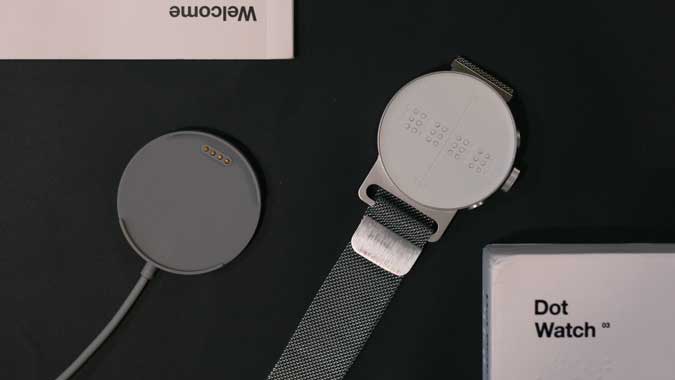
The Dot Watch comes in a white box that has information in both
English and Braille. You get an in-depth guide to help you get started
with the Watch, the manual is really easy to understand and has
instructions in Braille as well. You get the Dot Watch and a charging
adaptor in the box.
2. Design
The watch looks and feels premium with an Aluminium body bonded by a
steel strap and a magnetic buckle. The back of the watch has a pogo pin
connector where the adaptor snaps on and charges the watch. The watch
dial is a clean white surface but has a lot of technology embedded in
it. It is a scaled-down version of the
Refreshable Braille Display that has been molded into a smart Watch.

3. Interface
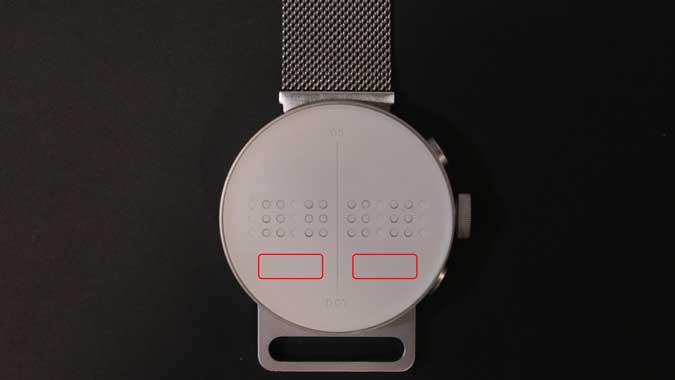
The dial is divided into two sections separated by a line in the
middle to make it easier to navigate with touch. It has four braille
cells with 6 dots each that can produce any Braille character by raising
and lowering the dots. The dots in a cell are really tactile to touch
and hold their position when in use. It may not be visible but the dial
also has two touchpads on either section of the dial right under the
braille cells that will be used to navigate and read out notifications.
We’ll come back to that in the latter part of this review.
The watch also has a “Tactile mode” that allows you to use the Watch even if you don’t know Braille.
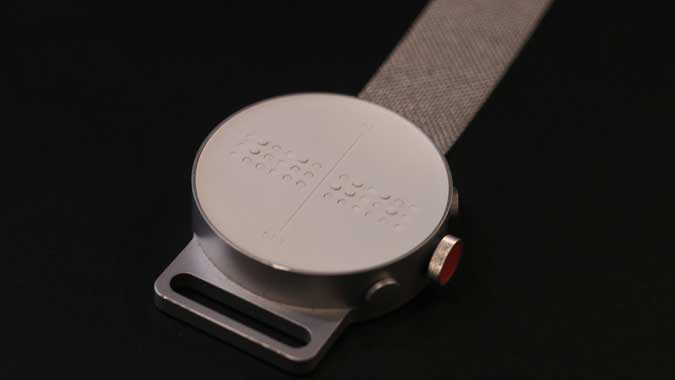
Other than the dial, you have two buttons and a crown on the right
side of the watch that would be used to access the entire interface of
the watch. You can even rotate the interface upside down using the app
to make it more convenient for people wearing it on their right hand.
4. Features
Dot Watch 3 has two modes; you can either use it standalone or pair
it with a smartphone. If you pair it with a smartphone using the Dot
Watch app, you would be able to read out notifications on the Watch
itself and that is really impressive. Pairing the watch to the app is
simple much like any other smartwatch on the market and you can use it
with both Android and iPhone.
Dot Watch tells you the current time, date, battery level, and
notifications. You can also set a timer on the watch and start a
stopwatch to time things.
5. Navigating the Interface
Even though the instruction manual has sufficient information on how
to use the Watch, I want to add some personal insights. The button on
the top is the Select button, and the button on the bottom is the Home/
Power button. Pressing the Home button lowers all the dots and puts the
Watch in rest mode.
Tell the Time: Press the Select button once to raise
the dots and read the current time in hours and minutes, press the
Select button again to read the seconds, and pressing the dots again for
the third time gives you the current date. The Watch supports both 24
and 12-hour format which can be easily changed from the app or from the
Watch itself.
Navigate the Watch Menu: You can access the Dot
Watch features by rotating the crown. Press Home to ensure all the cells
are inactive. Now, rotate the crown clockwise until you get vibrational
feedback. It would mean that you’re on the first menu option. You can
start rotating the crown counter-clockwise slowly to scroll the menu.
The cells would raise the letters and you can select the menu option by
pressing the select button.
 Read Notifications:
 Reading notifications on the Dot
Watch is easy. Simply rotate the crown until it reads ‘NOTI’ on the
dial and presses the Select button. If there are no notifications, it
would just read “NONE” otherwise it will start raising the letters. As
there are only four cells, you are limited to four characters but you
can tap the touchpads below the cells to scroll forwards and backward.
Tactile Mode: The Tactile mode is designed for users
who don’t know Braille. Instead of showing Braille characters, this
mode would tell you time by raising the number of pins. For example, to
show 6:02 it will raise 6 dots on the left part of the dial and two dots
on the right part. The Tactile mode is only limited to basic functions
of the Watch and still show any notifications in Braille.
6. App Integration
I highly recommend using the Dot Watch 2 app as it offers additional
features. For starters, you won’t have to manually set the time and date
if you pair it with the smartphone. You would be able to read
smartphone notifications right from the watch. The app supports multiple
languages such as Korean, English, Spanish, German, French, Russian,
Arabic, Chinese(Simplified), and Vietnamese.
You would also be able to add memos to the Watch from the app. This
feature would come in handy if you want to jot down something important
and read it out later. Apart from that, you can enable hourly alerts,
set alarms on the Watch, and even find the Watch from the app. I
would’ve liked it even more if the Watch made a sound but right now it
just vibrates.
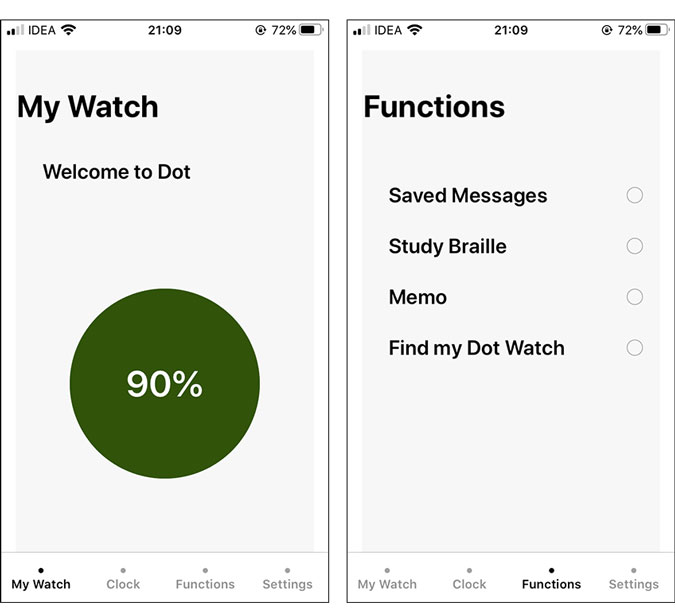
If you’ve never used a refreshable Braille Display before then the
Study Braille feature will come in handy as it will help you get
familiar with the letters and numbers on the Watch. To use it, you send a
letter, word, or a number to the Watch and the Watch displays it on its
dial.
7. Battery Life
The Dot Watch doesn’t mention the battery capacity on their website
but claims a 10-day battery backup. During my brief testing period, the
battery did last for around a week.
8. Limitations
I really enjoyed using the Dot Watch but I had to make a conscious
effort to prevent any water splashes on the Watch. Considering it has 24
holes and mishaps always happen, I would’ve preferred if the Dot Watch
came with an IP rating or Water resistance of some sort. Other than
that, it is an impressive piece of tech.
9. Price
Dot Watch 3 retails at around $300 and you can purchase the Watch from their
official website. Currently, they ship the Watch to addresses in North America, South America, Europe, Asia-pacific, and Middle East/ Africa.
10. Should you Buy it?
Dot Watch is not a run of the mill product and obviously, doesn’t fit
in the traditional Smartwatch category. It is specifically designed for
people with visual impairments. Dot Watch doesn’t compromise on the
build quality and offers useful functions which makes it an easy sell.
In case you resonate with the features offered by the Dot Watch then you
should definitely check it out as it surely lives up to its claims.
Having said that, you can also check out the Apple Watch which is more
feature-rich and offers a VoiceOver mode for the visually impaired. Let
me know in the comments if you’re going to buy this Watch or connect
with me on
Twitter.
Join Geezgo for free. Use Geezgo's end-to-end encrypted Chat with your Closenets (friends, relatives, colleague etc) in personalized ways.>>
Comments
Post a Comment