By Jack M. Germain
10-13 minutes
If you are tired of distro hopping and want a computing platform that works without drama, check out the latest
Freespire Linux
release. Freespire, a U.S.-based distribution built on Debian/Ubuntu,
is a no-nonsense operating system that is uncomplicated to install and
use.
Freespire is released biannually. Developers on Feb. 11 released the
latest MATE edition, the first of two updated versions. KDE will come
out soon.
Two age-old sayings are apt when it comes to Linux distributions:
"Something old is new again," and "What goes around, comes around."
Their literal meanings actually have nothing to do with Linux
technology, but after two decades of reviewing computer operating
systems and applications, I often get the feeling that I am in some
Groundhog Day loop.
That was the case as I worked with the Freespire 6.0 release. Freespire is the free open source version of the commercial
Linspire operating system developed by
PC/OpenSystems. Both provide a very pleasant computing experience.
Freespire contains many of the same software packages as Linspire,
but it strictly follows the Free and Open Source Software (FOSS)
philosophy of providing only license-free software. So any Linspire
packages that require the community-based Freespire developer team to
purchase a license to redistribute the distro are left out.
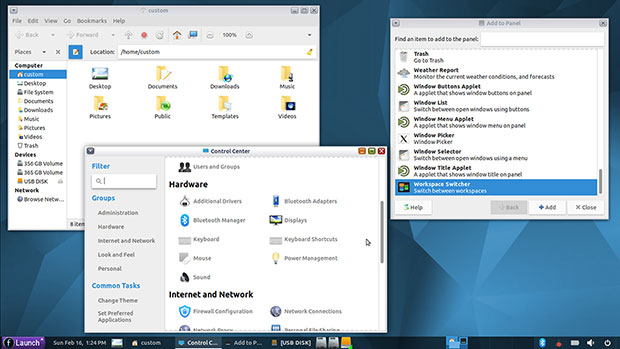
Freespire
6.0 MATE Edition keeps Linux simple with a classic panel and GNOME
2-style controls and window styling that resembles Windows 7.
Familiar Name-Calling
The Linux desktop has been the wanna-be replacement for Microsoft
Windows for more than a decade. Some software developers are vocal about
how ideally suited their distributions are to serve as a Windows clone.
Saying that a particular distro has a look and feel familiar to
Windows 7 users, for instance, easily can be misunderstood by Linux
newcomers. Saying that a distro frees users from the agonies of Windows
is much more accurate. However, compatibility with Windows is quite a
different marketing push.
Freespire goes a long way toward avoiding those advertising pitfalls.
Yes, Freespire 6 has a clean and simple look that does resemble Windows
7. Freespire is also easy to install, use and maintain.
The distro's current open source team avoids the generalizations that
compare this OS to Windows. The developers make good on their
assertions that users can enjoy trouble-free computing with Freespire
Linux. That is a big improvement that sets proper expectations.
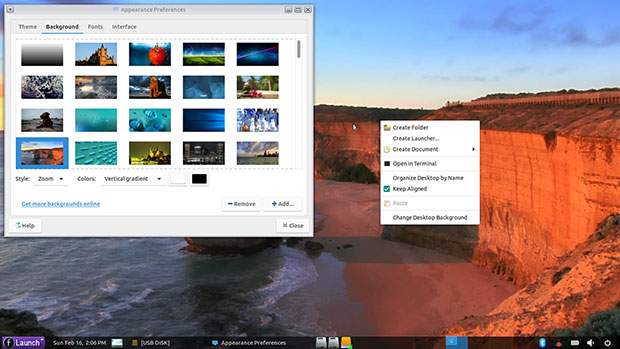
Freespire Linux has a well-stocked selection of background images and simple desktop layout.
Going Separate Ways
In the early 2000s, a company named "Linspire" released a Linux distro
called "Lindows." It contained tools for running actual Windows programs
and tools for more easily handling Linux package management.
Do not confuse this Lindows distro with the
LinDoz edition of the MakuluLinux upgrade I reviewed a few weeks ago. There is no connection between the two.
The "Lindows" moniker triggered trademark complaints from Microsoft.
So the third-party developer rebranded its Linux OS as "Linspire." It
used its OS to run a line of Linux-powered desktop computers sold
through Walmart.
That marketing venture largely failed. Shoppers thought they were
buying a bargain windows computer, according to various reports.
Linspire vacated store shelves and faded away.
Sold, Buried, Resurrected
In July of 2008, I wrote a news article for LinuxInsider about then custom Linux provider Xandros announcing that it
acquired the Linspire and Freespire Linux desktop operating systems
from another developer company. The plan was for Xandros to combine
technologies, expertise and market presence to become a one-stop Linux
solutions company.
I lost track of the developments after that and could not find any
record of product releases or additional corporate purchases until
December 2017. That is when PC/Open Systems announced that it had
acquired the Linspire and Freespire marks.
The company was considering what to do with the properties and whether
"it could successfully bring to market these products and shed the
controversy and bad decisions of the past from Linspire Inc. and Xandros
without abandoning [its] current customer base."
That led to Freespire becoming a free operating system based on
Ubuntu. An open source community took over development as the free
distro transitioned to Freespire Linux. PC/Open Systems continued the
commercial development and marketing of Linspire Linux.
PC/Open Systems still has a hand in the separate Freespire distro,
however. The community support forums for current Freespire releases are
maintained at the
Linspire community support site run by PC/Open Systems.
Parallel Paths
Especially with Microsoft no longer supporting Windows 7, Freespire is
an attractive Linux distro for users wanting a reliable and similar
desktop environment for free.
Meanwhile, the Linspire Linux commercial version is available under
PC/Open Systems' Windows 7 Refugee Program. Consumers can purchase a
boxed set of the current commercial Linspire Linux version for US$30.99.
The non-commercial open source Freespire 6.0 distro is a free
download, but you can order an installation disk if you choose to pay
$15.99.
Be careful if you look for the free download. I found numerous older
websites still available that have only outdated Freespire versions.
Use the current "active" website
freespirelinux.com and not the defunct website -- freespire.org -- which has version 2.0.
You also can
get Freespire 6.0 here.
Freespire Linux Unboxed
Freespire 6.0's MATE release has an appearance that will appeal to
Windows 7 users. That same look and feel also will be reassuring to the
distro-hopping weary.
The MATE desktop is a continuation of GNOME 2.0 simplicity. It
provides straightforward functionality without the craziness of
drop-down and slide-out antics and other eye candy embellishments
proffered by the growing array of so-called modern desktop screen
displays.
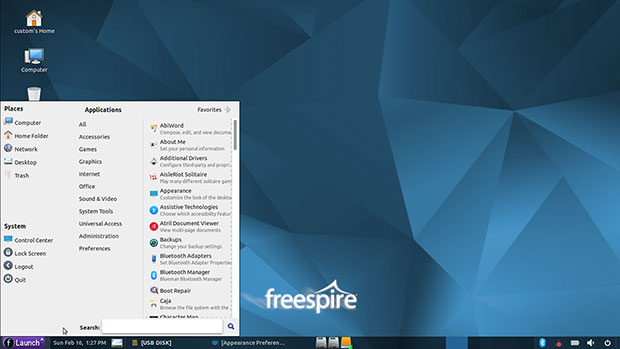
The Freespire 6.0 MATE desktop is uncluttered with a two-part main menu that makes finding everything quick and simple.
The default desktop view is uncluttered. Four Windows 7-style system
icons are pinned to the upper left edge of the screen. These give you
instant access to the Home and Computer directories. Both icons open the
Caja File Manager. A trash icon and an icon to open the Network Servers
panel complete the view.
The classic Linux panel is anchored across the bottom edge of the
screen. It has right-click menu access for adding applets, icons and
launchers to the panel, including the Virtual Workspace Switching tool.
The right end of this bottom panel displays the expected notification
icons. The main menu button is on the left end of the panel.
The main menu is a single panel with three columns. Places and System
categories fill the left column. The Favorites column fills the middle
and right column areas. A search window lies across the bottom of the
menu panel.
A button in the upper right corner of the menu panel switches the
view to all applications. That button changes to a Favorites switch to
return to the previous panel view.
The All Applications panel view displays three columns. On the left
are Places and System icons. The center column lists the menu
categories. The right column shows the application entries for the
designated category selected.
Right-click on any application title to access a pop-up display to
place that item on the desktop or panel, or to show in Favorites.
Right-click anywhere on the uncovered desktop to access options to
create folders, launchers or documents, or to change the background or
organize desktop preferences.
The one option missing is a launcher for the menu, such as is available in the Xfce desktop.
Software Levels
This release has MATE version 1.20. and Linux Kernel 5.3.0-28. The
distro uses the Synaptic Package Manager to add/remove software and
receive system updates.
The Control Panel is a separate entry within the main menu. It has a
well organized layout with a search window that makes finding settings
options a breeze.
The preinstalled applications are what you typically find in
lightweight systems. That surprised me since MATE is not an underpowered
desktop environment. Included are basic programs for everyday computing
tasks: surfing the Web, writing, handling email, and playing music and
videos. Other basic graphics programs and editors are not the best of
what is available in other distros.
Having to obtain and install better quality applications is a mere
annoyance for experienced Linux users. For a Linux user migrating from
Windows or Mac, however, not knowing what to look for can be a bigger
problem.
Here is a sampling of the bundled software titles:
- Chromium Web Browser (the open source version on which Google Chrome is based)
- Abiword -- a really lightweight junior word processor
- Gnumeric -- a lightweight spreadsheet
- Parole media player
- Shotwell photo organizer
I was pleased to see Ice SSB included. This is an integrated website
launcher that lets you access preselected websites to run as Web apps
without having to use a standard Web browser. Not everyone is a fan of
Web apps, but being able to "run" Web-based computing tools as if they
were locally installed programs has its advantages.
The distro maintains a Software Center application that functions as a
front end to the community's software repository. It is an alternative
to using the Synaptic Package Manager.
Bottom Line
Freespire Linux 6.0 is a solid performer. I have not used the MATE
desktop in quite a few years, but checking it out for this review
instantly returned me to simpler days of using the Linux OS . I was a
dedicated fan of the GNOME 2 desktop years ago and followed along with
MATE rather than put up with the unsettling changes in the early
releases of GNOME 3.
I like the simple approach Freespire brings to using Linux, and I'm
anticipating the release of the KDE version. Check back in upcoming
weeks for an update when the KDE version of Freespire 6.0 is available.
Want to Suggest a Review?
Is there a Linux software application or distro you'd like to suggest
for review? Something you love or would like to get to know?
Please
email your ideas to me, and I'll consider them for a future Linux Picks and Pans column.
And use the Reader Comments feature below to provide your input!
Join Geezgo for free. Use Geezgo's end-to-end encrypted Chat with your Closenets (friends, relatives, colleague etc) in personalized ways.>>
Comments
Post a Comment